Transmitter-Sensors can have threshold types set against them. Each threshold can be given a value, outside of which an Alarm will be given. You cannot create or delete thresholds, you can only change them. When a Transmitter-Sensor has been registered, installed, and when it starts sending data to the Base Unit, Notion Lite will automatically create thresholds and assign default values to them. The thresholds are 'disabled' by default, you have to 'enable' them by editing the thresholds and selecting the Enabled tick box.
Thresholds are of three basic types:
General Thresholds

In the above example a threshold of '1 bar' has been set, which corresponds to the number of 'filled bars' which appear on the 'Battery Level' icon on the Welcome page:

For this threshold, when a battery is 'down to one bar' an alarm will be raised.
For the 'Missing Data' threshold type, an alarm is raised if no data has been coming from the Transmitter-Sensor for 60 minutes.
Temperature Thresholds
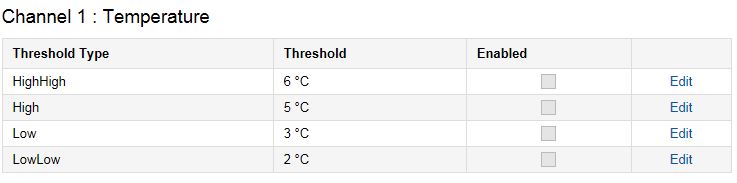
In this case, four thresholds have been set. If temperature goes above the High or HighHigh values, or below the Low or LowLow values, an alarm will be raised.
Time Open Thresholds

Here, the threshold has been set such that if a door is left open for more than 5 seconds, an alarm will be raised.
Note: Some Transmitter-Sensors are single channel (temperature) and do not have Channel 2 (Time Open)